My Rush
- 4.2
- Rating
- 10.00K
- Installs
- Free
- Price

 Analysis by App-foxy
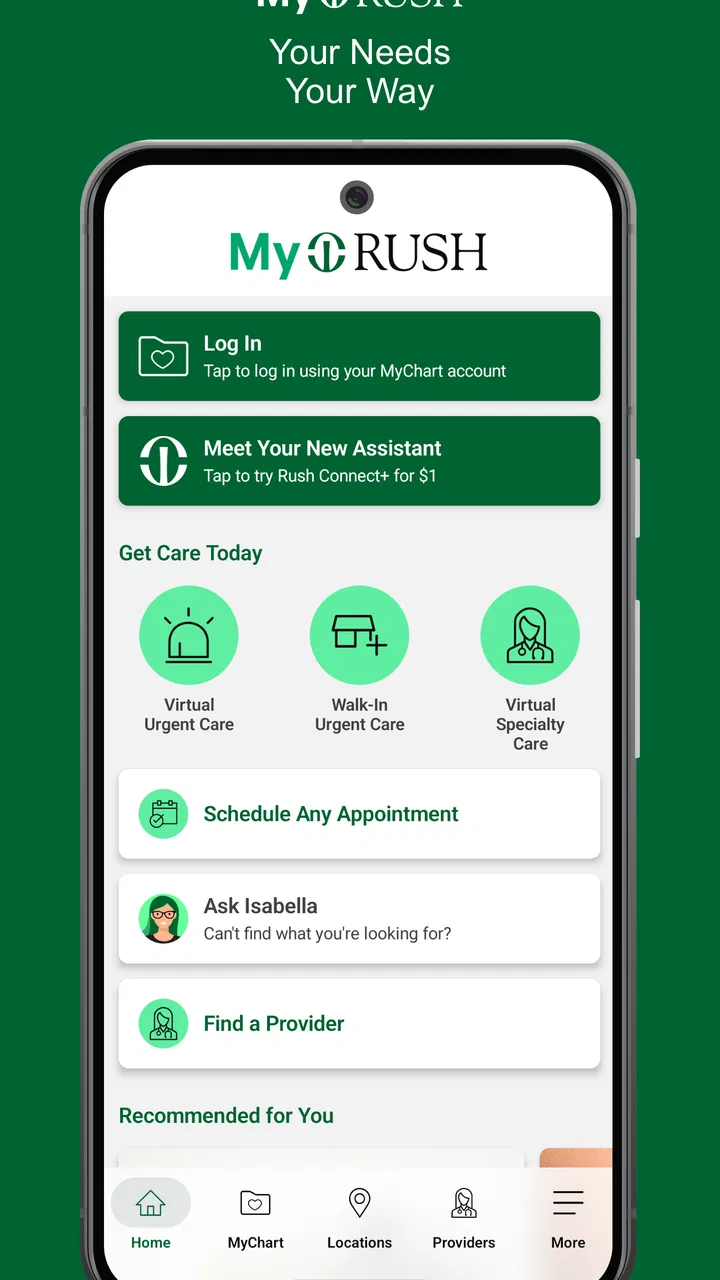
Managing healthcare is rarely a calm, single-task activity. I usually reach for a medical app while moving between appointments, trying to remember a question before calling a clinic, or checking something when my attention is already divided. My Rush is designed for that kind of relationship with care: it brings Rush University System for Health’s digital healthcare experience into one mobile app instead of making me jump between unrelated tools. After spending time with it, I found the main appeal less about novelty and more about reducing the small amount of friction that can make healthcare administration feel harder than it should.
My Rush is a free medical app for Android and iOS users, with a Teen content rating. It was released on March 12, 2025, and the current version is 1.6.2. The app has reached over ten thousand installs, with an average rating of 4.2 from more than two hundred ratings. Those figures suggest a useful but still relatively focused service rather than a universal health platform. The important question is not whether it replaces every healthcare tool, but whether it fits naturally into your connection with Rush.
How My Rush feels when healthcare depends on a connection
The first thing I noticed is that the app’s usefulness is closely tied to connectivity. A healthcare app is not like a calculator or a notes app, where the core experience can remain available even when the signal disappears. My Rush is most valuable when it can reach the relevant healthcare service and return current information. That makes a stable connection part of the experience, especially when I am trying to complete an action rather than simply open the app.
You May Also Like

 AccuWeather: Weather Radar
AccuWeather Review: A Quick, Clear Forecast for Everyday Decisions
For everyday plans, the best forecast is the one you can understand quickly. AccuWeather makes rain timing, radar, and local conditions easy to act on, with a few trade-offs.

 Hill Climb Racing
Why Hill Climb Racing Still Turns Crashes Into One More Run
A tiny car, a bumpy hill and one more upgrade: Hill Climb Racing keeps resurfacing because its simple chaos makes every near-miss feel personal.

 AliExpress - Shopping App
AliExpress Makes Global Shopping Feel Personal, but Shoppers Bear the Risk
AliExpress turns a global marketplace into a pocket-sized discovery engine. Its reach is useful, its shopping loop compelling, and its trade-offs easy to miss.

 Lords Mobile: Kingdom Wars
Lords Mobile Is a Kingdom-Building Routine, Not a Quick Match
A case-by-case verdict on the building, battles, device demands, and social commitments that make Lords Mobile rewarding for some players and exhausting for others.

 PDF Scanner app - TapScanner
TapScanner Makes Paperwork Easier to Capture, Check, and Share
TapScanner makes scanning with a phone feel less like a rescue operation and more like a dependable step in getting work done. Its capture tools are useful, though not flawless.

 Block Blast!
 Shows How Much a Puzzle Game Can Leave Out
A quiet grid game shows why puzzle players increasingly value instant clarity, repeatable skill and low-pressure play—and where the genre still needs to catch up.
More From Our News Desk
View All News


This matters in ordinary situations. Imagine leaving work and remembering that you need to deal with a healthcare task before the evening gets busy. If the app loads normally, a phone becomes a convenient starting point: I can open My Rush, review what is available to me, and continue without sitting at a desktop. If the network is congested on public transport or weak inside a large building, the same task may become slower and less reassuring. The app’s value is therefore practical, but not entirely independent of the environment around me.
I would not treat the app as a replacement for urgent medical help. A connected patient-management tool is useful for organizing care, but an emergency should be handled through the appropriate emergency service. That distinction is easy to overlook when a phone is always within reach. My Rush is best understood as a channel for managing an existing healthcare relationship, not as a diagnostic authority or a substitute for professional judgment.
The developer, Rush University System for Health, gives the app a clear institutional identity. That can be reassuring for people already receiving care through Rush because the app feels connected to the organization they know. It is less compelling for someone whose doctors and records are elsewhere. In that case, a general health app or the official patient app from another provider may be more useful, even if it has a similar purpose.
What changes when the signal is weak
Connectivity affects more than loading speed. When I am dealing with healthcare, I want to know whether an action has actually gone through, whether the information on screen is current, and whether I should try again. A slow response can create uncertainty, particularly if I am handling an appointment-related task or checking information that I expect to be accurate at that moment.
My practical advice is to avoid leaving an important task until the last minute. If I know I have a healthcare appointment or a question to handle, I would open the app earlier while I have a dependable connection. This is not glamorous advice, but it is one of the most useful habits for any network-dependent healthcare service. It gives me time to notice a sign-in problem, retry a page, or use another route if the app is temporarily uncooperative.
I also prefer to pause after submitting anything rather than tapping repeatedly. A delayed connection can make multiple taps feel necessary, but repeated attempts may make it harder to tell what happened. Waiting for a clear response, then checking the resulting screen, is a safer workflow. This is a small detail, yet it is exactly the kind of behavior that separates a calm mobile healthcare experience from a frustrating one.
Using the app in real mobile situations
My Rush makes the most sense for people who handle healthcare away from a desk. I can picture using it in a waiting room, before leaving home, or during a short break at work. The phone format is especially helpful when I do not want to remember a web address, find a computer, or keep several browser tabs open. The convenience comes from having a familiar entry point for Rush-related tasks.
At the same time, mobile convenience does not mean every context is equally good. A crowded train, a basement, or a hospital area with inconsistent reception can make a connected healthcare app feel less dependable. Small screens also encourage quick decisions. I would avoid rushing through an important detail simply because I am using a phone. For anything involving dates, instructions, or personal information, I would slow down and verify what I am reading before continuing.
One useful approach is to separate preparation from action. Before opening My Rush, I can make sure I know what I am trying to accomplish and have any relevant details ready. Then I use the app for the connected part of the process instead of wandering through it while distracted. This reduces the time spent online and makes it easier to recognize whether the result matches my intention.
Another realistic use is preparing for a conversation with a healthcare professional. Rather than relying on memory while sitting in an appointment, I can think through my questions beforehand and use the app as one part of my preparation. The app does not remove the need to communicate clearly, but it can make the administrative side of that communication more organized. For caregivers or family members helping someone else, the value will depend heavily on how the account and access arrangements are set up; I would not assume that one person can automatically manage another person’s care.
The Teen rating is worth noticing for households. It does not mean the app is a game or a casual wellness tool. It signals that younger users should approach it with an appropriate level of maturity, especially because healthcare information is personal. Parents and teens should be clear about whose account is being used and who is responsible for decisions. The app may help with access to care, but it should not encourage a young person to handle serious medical concerns alone.
When something goes wrong, the recovery path matters
Every connected app eventually encounters a failed load, an expired session, or a moment when the service does not respond as expected. With My Rush, I judge the experience by how sensibly I can recover. My preferred sequence is simple: check the connection, wait briefly, reopen the relevant screen, and confirm whether the intended result is already visible before trying again.
I would also keep the app updated. Version 1.6.2 is the current release, and using the current version is a sensible way to avoid problems that may already have been addressed. Updating is particularly important for a healthcare app because reliability matters more than having the newest visual design. If an issue continues after updating and retrying on a stable connection, the sensible next step is to use Rush’s normal support or contact channels rather than repeatedly submitting the same request.
A second recovery habit is to record the practical details of a failed attempt. I do not mean keeping sensitive medical information in an unprotected note. I mean remembering the general action I was trying to complete and the point at which the app stopped responding. That makes it easier to explain the problem if assistance is needed and reduces the chance of starting over without knowing whether the first attempt succeeded.
There is also a human side to failure recovery. If I am checking healthcare information while anxious, a technical delay can feel more serious than it is. I try to distinguish between an app problem and a medical problem. A loading issue should be handled as a technical inconvenience; a concerning symptom should be addressed through appropriate medical care, not by waiting for a screen to refresh.
Keeping mobile healthcare use focused and data-conscious
Because My Rush deals with healthcare, I would use it deliberately on shared or public devices. I would avoid leaving the app open where another person can read the screen, and I would be careful when using public Wi-Fi. The point is not to make the app seem unsafe; it is simply good digital hygiene whenever personal healthcare information is involved.
I also prefer to limit unnecessary browsing. Opening the app only when I have a clear task can reduce exposure on a borrowed connection and helps me stay focused. If I am in a place with poor reception, I would wait until I have a stronger connection for anything important rather than repeatedly refreshing. This is more practical than treating cellular data as an unlimited solution to every loading problem.
A useful routine is to handle several related administrative tasks in one deliberate session, provided I have enough time and a reliable connection. That can be more efficient than opening the app repeatedly throughout the day. However, I would not stay signed in or keep sensitive screens visible simply for convenience. The best balance is short, purposeful sessions followed by closing the app or locking the phone.
People who are especially careful about mobile data should pay attention to when they use the app. A home or trusted Wi-Fi connection is preferable for longer sessions, while a strong mobile connection may be fine for a quick check. I would avoid assuming that every screen behaves identically, because pages containing more information can take longer to load than a simple navigation screen. This is another reason to plan healthcare administration instead of trying to do it hurriedly in a low-signal location.
Who will benefit most from My Rush
I think My Rush is a good fit for existing Rush patients who want a single mobile doorway into their healthcare relationship. It is also useful for people who dislike managing healthcare through scattered browser bookmarks or phone calls alone. The free price removes an obvious barrier, and the app’s focused medical purpose is easier to understand than a broad wellness platform filled with unrelated tracking features.
The strongest use case is someone who already knows that Rush is part of their care and wants mobile convenience for routine management. A person who frequently moves between home, work, and appointments may appreciate having a dedicated app ready when a healthcare task comes to mind. The experience is less valuable for someone looking for exercise tracking, nutrition coaching, medication discovery, or a general symptom checker. Those needs belong to different types of apps.
I would also be cautious about recommending it as the only healthcare tool for a household with many providers. If your care is divided among several health systems, you may prefer a broader health-record strategy or each provider’s own official app. My Rush’s institutional focus is its strength for Rush users and its limitation for people whose care is spread elsewhere.
Compared with using a mobile browser, a dedicated app can feel more direct because it gives me a recognizable place to begin. The trade-off is that it adds another installed app to maintain and another account experience to manage. Compared with calling a clinic, the app may be more convenient for routine digital tasks, while a phone conversation remains better when the situation is complicated, urgent, or difficult to explain through a screen. I see My Rush as a complement to those alternatives, not a complete replacement for them.
My final view on staying connected with Rush
My Rush succeeds when I use it for what it is: a mobile healthcare-management app tied to Rush University System for Health. I like the idea of having a dedicated route to routine care administration, especially when I am away from a computer. The experience feels most worthwhile for people already connected to Rush, and the free cost makes it easy to try without adding a financial commitment.
The main limitation is not a lack of ambition but the dependence on a working connection and a suitable context. A weak signal can interrupt the sense of control that healthcare apps are supposed to provide. I would not rely on it for a last-second task in an unreliable location, and I would not use it as an emergency service. Planning ahead, confirming completed actions, keeping the app current, and protecting the phone make the experience noticeably more dependable.
With a 4.2 average and more than ten thousand installs, My Rush has a modest but meaningful footprint. My recommendation is straightforward: if Rush is your healthcare system and you want a focused mobile companion, it is worth trying. If you need one app to unite unrelated providers or expect comprehensive offline access, a different approach may suit you better. For the right user, the real advantage is a simpler connected path to managing care when a phone is more convenient than a desk.
In my experience, that makes My Rush a practical rather than flashy medical app. Its best moments happen when I prepare the task, use it on a reliable connection, and treat the result as part of a wider relationship with healthcare professionals. Used that way, it can remove a few everyday obstacles without pretending to solve every healthcare need.
FAQs for My Rush
01What is My Rush and how does the app work?
My Rush is a mobile application designed to give users quick access to its available services, content, or account features from an Android or iOS device. After installing it, you generally create an account or sign in, browse the main sections, and use the tools provided by the platform. The exact experience may vary depending on your location, device, and the latest app version.
02Is My Rush free to download and use?
My Rush can typically be downloaded without an upfront installation fee, but some features or services may require payment, a subscription, or an in-app purchase. Before confirming any transaction, review the displayed price, renewal terms, and cancellation conditions carefully. Availability of paid options can also differ by country, operating system, promotional offer, and whether you are using a personal or business account.
03What information is required to create a My Rush account?
The registration process may ask for basic details such as your name, email address, phone number, or another form of account identification. Depending on the features you use, My Rush could also request additional information for verification, payments, or personalized services. We recommend checking the app’s privacy policy and only providing accurate information through the official application or its authorized website.
04Is My Rush safe to install and use?
My Rush should be downloaded from the official Google Play Store or Apple App Store to reduce the risk of installing an altered or unsafe version. As with any app, check the developer name, recent reviews, requested permissions, and update history before installing. Avoid sharing passwords or payment details outside the official app, and keep your device’s operating system updated for better security.
05What should I do if My Rush is not working correctly?
If My Rush crashes, fails to load, or does not display the expected features, first check your internet connection and confirm that you are using the latest version. Closing and reopening the app, restarting your device, or reinstalling it may also help. If the problem continues, consult the official support section and include your device model, operating system, app version, and a clear description of the issue.
Pros
- Simple controls make the game easy to pick up and play.
- Short races fit well into quick gaming sessions.
- Bright visuals give the game a cheerful
- accessible style.
- Progression offers a reason to keep completing more races.
- Works well for casual players who prefer uncomplicated gameplay.
Cons
- Gameplay may feel repetitive after extended play sessions.
- Some players may find the challenge uneven between levels.
- Limited depth may disappoint fans of advanced racing games.
- Ads can interrupt the experience
- depending on the game version.
- The game may require a stable connection for certain features.

My Rush
Gallery